Here's a story I've heard at least a dozen times in the last year. A team builds an AI agent over a long weekend. It works. It's actually good. They demo it to leadership, get the green light, and roll it out to production. Two weeks later, the GCP bill is six figures, the agent is timing out on long-running plans, traces are vanishing into a black hole, and somebody just discovered that one prompt-injection attempt drained a Stripe sandbox because nobody scoped the IAM role.
This is the prototype-to-production gap, and it's where most agent projects quietly die. The model isn't the problem. The model is great. The problem is everything around the model -- the GPU scheduling, the session state, the autoscaling, the observability, the security boundary. None of that lives inside the LLM. All of it lives in your infrastructure, and most teams don't realize they need it until the pager goes off.
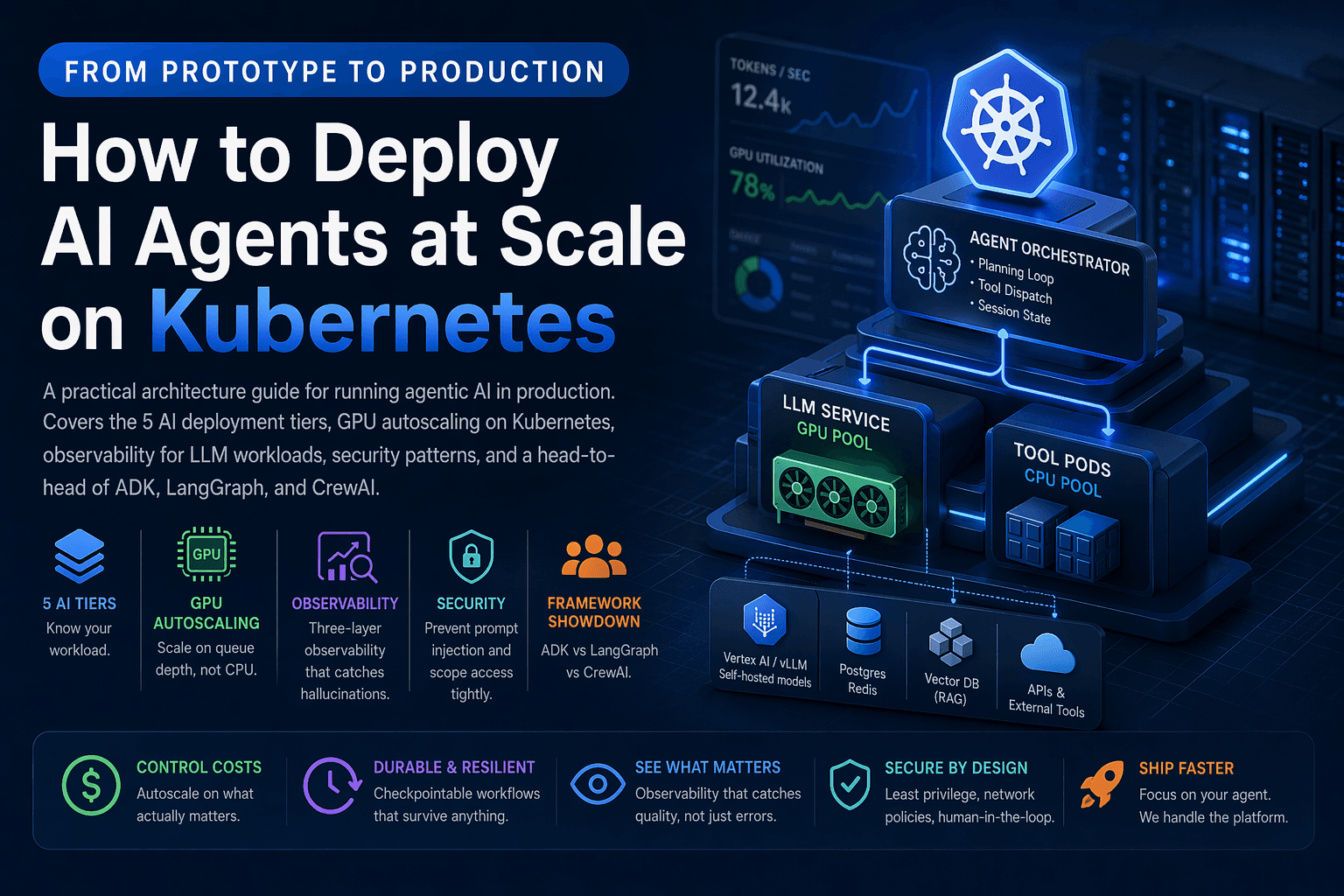
This post is the playbook I wish more teams read before they shipped. We'll walk through the five tiers of AI workloads, why Kubernetes ended up as the default platform for serious agent deployments, how to autoscale GPU pods without lighting money on fire, the observability stack that actually catches hallucinations (not just 500 errors), the security patterns that prevent the worst-case scenarios, and a brutally honest comparison of the three frameworks fighting for the agent layer in 2026.
Grab a coffee. This one's longer than usual.
Last updated: April 2026
The Five Tiers of AI Workloads (And Why It Matters)
Before you architect anything, get honest about what kind of AI workload you're actually running. The infrastructure requirements scale brutally with each tier, and the most common mistake is building tier-2 infrastructure for a tier-4 problem.
| Tier | What It Does | State | Lifetime | Hardest Problem |
|---|---|---|---|---|
| 1. Inference | Single prompt → single response | None | Milliseconds | Latency under load |
| 2. Conversational | Multi-turn chat with memory | Session | Minutes | Session affinity |
| 3. Retrieval-Augmented | RAG over a knowledge base | Vector store | Seconds | Index freshness |
| 4. Agentic | Plans, calls tools, decides next step | Goal + memory + tool state | Minutes to hours | Long-lived processes |
| 5. Multi-Agent | Specialized agents coordinating | Distributed | Hours to days | Coordination + observability |
Tier 4 is where things get weird. An agent that plans, executes, retries, and reasons across thirty tool calls isn't "a chatbot with extra steps." It's a long-lived, stateful, GPU-hungry process that breaks every assumption your stateless web stack was built on. Anthropic's engineering team wrote a fantastic essay on building effective agents that's worth reading before you commit to any architecture -- it lays out the difference between workflows and true agents better than anything else I've seen.
If you want the business framing, what is agentic AI covers why this category is suddenly everywhere. And Gartner's 2025 strategic technology trends list agentic AI as the #1 trend of the year, with the prediction that 33% of enterprise software will include agentic AI by 2028, up from less than 1% in 2024. That's not a slow climb. That's a step change.
Why Kubernetes Won the Agent Infrastructure Layer
Three years ago, "deploy your agent" meant a Python process on a VM. That works for a demo. It does not work for production. Here's why Kubernetes -- and especially managed offerings like Google Kubernetes Engine, Amazon EKS, and Azure AKS -- ended up as the default.
Agents need the things K8s already does well: GPU scheduling, autoscaling, secret management, network isolation, rolling deploys, and pod-level crash recovery. The CNCF's 2024 survey puts Kubernetes adoption in production at 93% of surveyed organizations, which means the platform skills are everywhere. You're not betting on something exotic.
GKE in particular has leaned hard into AI workloads. GKE's documentation on running AI/ML workloads covers GPU and TPU node pools, dynamic workload scheduling, and integration with Vertex AI for model serving. AWS has a similar story with EKS and Inferentia/Trainium accelerators. Pick whichever cloud you're already on -- the patterns transfer.
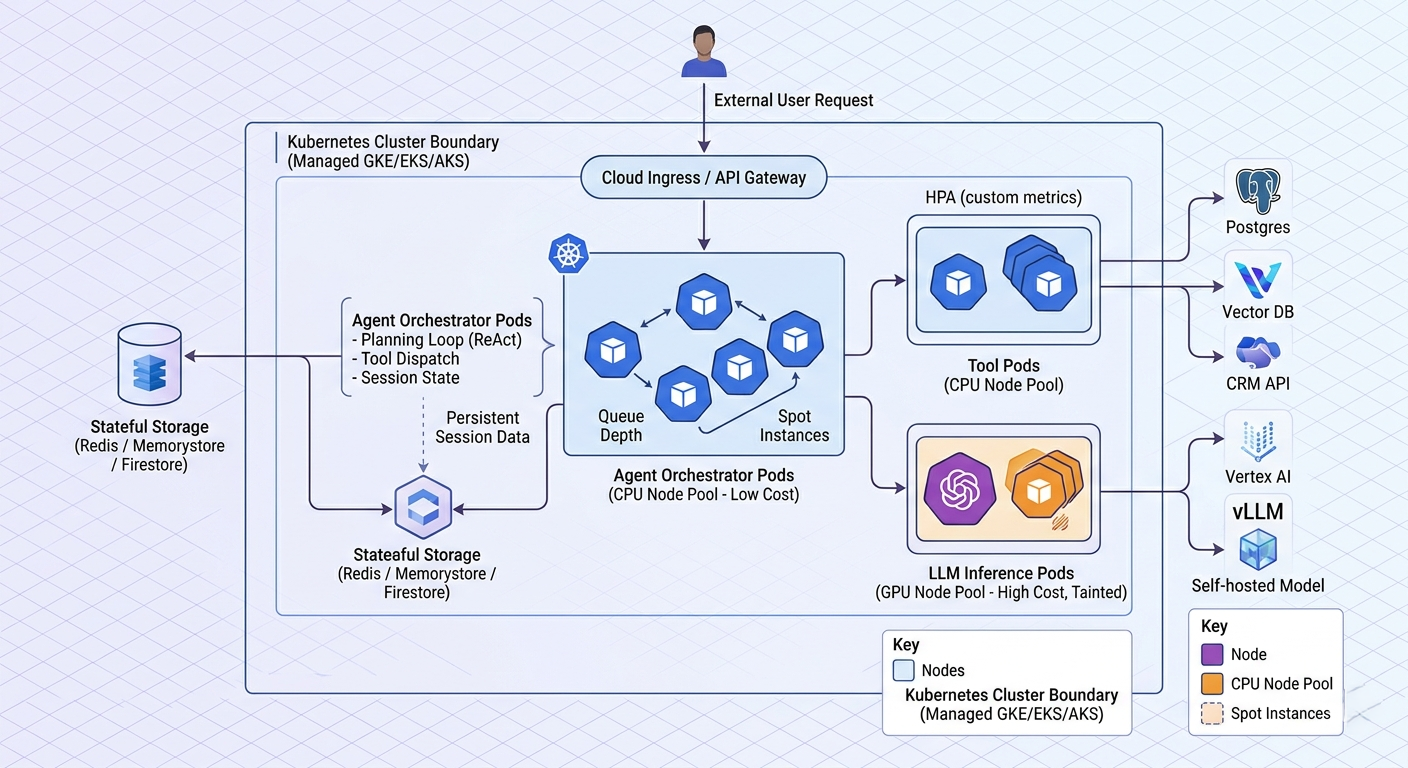
Here's the architecture most production teams converge on:
                       ┌──────────────────────────┐
   User request ──────►│  API Gateway (Ingress)    │
                       └────────────┬─────────────┘
                                    │
                       ┌────────────▼─────────────┐
                       │  Agent Orchestrator Pod   │  (CPU node pool)
                       │  - planning loop          │
                       │  - tool dispatch          │
                       │  - session state          │
                       └─┬────────────┬───────────┘
                         │            │
              ┌──────────▼──┐   ┌─────▼────────┐
              │ LLM Service │   │  Tool Pods   │
              │ (GPU pool)  │   │ (CPU pool)   │
              └──────┬──────┘   └─────┬────────┘
                     │                │
                     ▼                ▼
              Vertex AI / vLLM   Postgres, Redis,
              self-hosted model  CRM APIs, vector DB
The split that matters: keep your orchestrator pods on cheap CPU nodes and your inference pods on GPU nodes. Most teams accidentally bundle them and end up paying GPU prices for what is essentially HTTP routing. I've seen this exact mistake cost a startup over $40,000 in the first month before anyone noticed.
GPU Node Pools: The Cost Lever Nobody Optimizes
Let's talk money. A single A100 node on GCP's a2-highgpu-1g machine type runs around $3-4 per hour at on-demand pricing. Run ten of them 24/7 and you're at roughly $30,000/month before you've served a single user. Most teams over-provision because they're scared of cold starts, and then under-utilize because they autoscaled on CPU instead of the metric that actually matters.
Three rules that have saved teams I've worked with serious money:
1. Use a dedicated GPU node pool. Mixing GPU and non-GPU workloads on the same nodes wastes capacity. Taint your GPU nodes so only inference pods land there. The GKE GPU documentation walks through the exact node pool config:
# gpu-node-pool.yaml (excerpt)
nodeConfig:
  machineType: a2-highgpu-1g
  guestAccelerators:
    - acceleratorCount: 1
      acceleratorType: nvidia-tesla-a100
  taints:
    - key: nvidia.com/gpu
      value: "true"
      effect: NO_SCHEDULE
2. Autoscale on queue depth, not CPU. This is the single biggest cost lever and it's the one most teams get wrong. CPU utilization on a GPU pod is a lie -- the GPU might be pinned at 100% while the CPU sits at 12%. Use a custom metric (request queue length, in-flight tokens, or pending agent tasks) and feed it to the Horizontal Pod Autoscaler via the custom metrics API:
# hpa.yaml
apiVersion: autoscaling/v2
kind: HorizontalPodAutoscaler
metadata:
  name: llm-inference
spec:
  scaleTargetRef:
    apiVersion: apps/v1
    kind: Deployment
    name: llm-inference
  minReplicas: 2
  maxReplicas: 20
  metrics:
    - type: Pods
      pods:
        metric:
          name: inference_queue_depth
        target:
          type: AverageValue
          averageValue: "5"
If you're serving open-source models, vLLM exports the right metrics out of the box. Pair it with KEDA for event-driven scaling and you've got a setup that scales on what actually matters.
3. Burst to serverless for spikes. Long-tail traffic spikes don't justify keeping idle GPU nodes warm. Route overflow to a serverless inference endpoint -- Cloud Run with GPU support, Vertex AI managed endpoints, or even Modal if you want pay-per-second granularity -- and pay only for the seconds you actually use. The cost difference between "burst to serverless" and "keep ten A100s warm just in case" is the difference between a sustainable AI product and a cash incinerator.
Sessions and State: The Hidden Hard Problem
Tier-1 inference is stateless. Tier-4 agents are anything but. An agent might be twelve minutes into a thirty-step plan when the pod gets evicted because of a node upgrade. If you didn't externalize state, the user starts over and your retention number quietly tanks.
Production-grade agent infrastructure treats every running agent as a checkpointable, resumable workflow. Two patterns work well in practice.
Pattern A: Session store + sticky routing. Persist conversation history and agent scratchpad to Redis, Memorystore, or Firestore after every step. Use sticky sessions on the load balancer so the same user routes to the same pod when possible -- but design so any pod can pick up any session if the original dies. This is the simpler approach and works for most agents.
Pattern B: Durable workflow engine. For complex multi-step plans, treat the agent itself as a durable workflow. Temporal and LangGraph (with checkpointing enabled) let you survive pod restarts without losing a single step of progress. This is the right pattern for any agent doing serious work over a long horizon -- think autonomous research agents, multi-day data pipelines, or anything where losing state means losing real money.
The relevant academic work here is the ReAct paper, which formalized the reason-act-observe loop that most modern agents use, and the Reflexion paper on self-reflection. Worth a skim if you're designing an agent loop from scratch.
Observability for AI Workloads: The Three-Layer Stack
Here's the part most teams get badly wrong. Standard APM tools -- Datadog, New Relic, Cloud Monitoring -- catch CPU, latency, and error rates. They tell you exactly nothing about whether your agent is doing the right thing. A perfectly healthy pod with a 200ms response time can be hallucinating wrong answers all day, and your dashboards will be green the whole time.
You need three layers, not one.
Layer 1: Infrastructure metrics. The usual stuff. Pod CPU, GPU utilization, memory, restart count, request latency. Prometheus plus Grafana, or Cloud Monitoring if you're on GCP. This catches "the pod is dead" -- nothing more.
Layer 2: Application traces. OpenTelemetry instrumentation across the orchestrator, the LLM call, the tool calls, and downstream APIs. Ship traces to Cloud Trace, Jaeger, Honeycomb, or Tempo. This catches "the request took 47 seconds because three retries fired against a flaky vector store." OpenTelemetry now has a GenAI semantic conventions spec that defines standard span attributes for LLM calls -- use it. Don't roll your own.
Layer 3: LLM-specific evaluation. This is the layer most teams skip and regret. Tools like LangSmith, Vertex AI Eval, Helicone, Arize Phoenix, and Langfuse capture the actual prompts, responses, tool calls, and let you score them for quality. Without this layer, you have no way of knowing if your agent is hallucinating, picking the wrong tool, or drifting after a prompt change. You're flying blind.
A reasonable observability stack for tier 4+ workloads looks like this:
| Layer | Tool | What It Catches |
|---|---|---|
| Infra | Cloud Monitoring / Prometheus | Pod health, GPU utilization |
| App tracing | OpenTelemetry → Cloud Trace / Honeycomb | Latency breakdown, retries, dependencies |
| Logging | Structured JSON → Cloud Logging / Loki | Tool dispatch, errors, audit trail |
| LLM eval | LangSmith / Langfuse / Vertex AI Eval | Hallucinations, tool accuracy, semantic quality |
| Cost | BigQuery + custom dashboard | Per-agent token spend, GPU hours |
The cost layer is the one most underestimated. Without per-agent token tracking, you'll discover too late that one badly-written prompt is burning $400/day on retries. Build the dashboard before you launch, not after the bill arrives.
Security: The Patterns That Prevent Catastrophe
The threat model for agents is broader than for traditional services. An attacker doesn't need to find a SQL injection -- they just need to talk to your agent. OWASP's Top 10 for LLM Applications is required reading and covers the major attack categories.
Prompt injection. Number one on the OWASP list, and rightly so. Treat every input the agent reads -- user messages, tool outputs, retrieved documents -- as untrusted. An attacker can hide instructions inside a PDF you upload to a RAG store. Simon Willison has been writing about prompt injection since 2022 and it's still the unsolved problem at the heart of agent security. Mitigations: strict tool descriptions, output validation, sandboxed execution, and never letting the LLM construct raw API calls or shell commands.
Privilege scoping. This is where most teams quietly fail. They give the agent service account broad IAM permissions because "we'll tighten it later." Then the agent calls a tool with a hallucinated parameter and writes to the wrong bucket -- or worse. Use Workload Identity Federation on GCP or IAM Roles for Service Accounts on EKS. Scope each agent's service account to the minimum set of resources it needs. Audit the IAM policy quarterly. The NIST AI Risk Management Framework has good guidance on the governance side if you need to defend the practice to compliance.
Human-in-the-loop for irreversible actions. Refunds over $X. Database writes. External emails. Anything you can't undo. The agent should propose the action and require approval -- either human or programmatic -- before execution. Bake this into the architecture, not just the prompt. A prompt-level guardrail can be talked around. An architectural one can't.
Network policies. Use Kubernetes NetworkPolicy to restrict which pods can talk to what. Your tool pods don't need internet access. Your inference pods don't need access to your CRM database. Default-deny and allow-list. Cilium gives you richer L7-aware policies if vanilla NetworkPolicy isn't enough.
For more on data handling specifically, how Chatsby handles sensitive data covers the practices we've found matter most in customer-facing deployments.
Framework Showdown: ADK vs LangGraph vs CrewAI
Three agent frameworks dominate production deployments in 2026. They are not interchangeable, despite what the marketing pages might suggest.
| Google ADK | LangGraph | CrewAI | |
|---|---|---|---|
| Best for | Native Gemini + GKE shops | Complex stateful workflows | Role-based multi-agent teams |
| Mental model | Service-based agents | Graph of nodes and edges | Crews of specialized agents |
| State management | Built-in session memory | Explicit checkpointing | Per-agent memory |
| Tool calling | Native function declarations | Tool nodes in the graph | Tool registration per agent |
| Observability | Vertex AI Eval | LangSmith | Limited, BYO |
| Multi-agent | Yes (A2A protocol) | Yes (subgraphs) | Yes (first-class) |
| Lock-in risk | Higher (Google ecosystem) | Low | Low |
| Production maturity | Newer, fast-moving | Mature, battle-tested | Mid -- great for prototypes |
Pick Google ADK if you're already deep in Vertex AI and want the tightest GKE integration. It also speaks the Agent-to-Agent (A2A) protocol natively, which is Google's bid to become the standard for multi-agent communication. The trade-off is ecosystem lock-in. If you ever want to leave GCP, you'll be rewriting.
Pick LangGraph if you need durable, checkpointable, complex workflows and want vendor-agnostic infrastructure. This is the most common production choice in 2026 by a wide margin. The graph model is initially confusing but pays off when your agent gets non-trivial. LangGraph's docs on persistence are worth reading even if you don't end up choosing it -- they capture the right mental model for stateful agents.
Pick CrewAI if your problem genuinely maps to a team of specialists (researcher → writer → editor → reviewer) and you want to ship a multi-agent prototype fast. It's the friendliest of the three. Plan to migrate or rewrite when you scale beyond a few hundred concurrent crews -- the abstractions are great for getting started but get in the way at scale.
Worth watching: the Model Context Protocol (MCP), introduced by Anthropic in late 2024, which is rapidly becoming the standard way to connect agents to tools. It's framework-agnostic. If you're starting fresh in 2026, your tool layer should speak MCP from day one.
A Pragmatic Path from Prototype to Production
Here's the order I recommend teams move in. Skipping steps is how you end up rewriting in six months.
Step 1: Pin down the workload tier. Be honest with yourself. If you're doing tier 4, don't pretend you're doing tier 2. The infrastructure decisions are completely different and the cost of getting it wrong compounds.
Step 2: Externalize state from day one. Even in your prototype, write session state to a real store -- Redis, Firestore, Postgres, whatever. This costs you nothing now and saves you weeks later when you need to scale horizontally.
Step 3: Containerize and split orchestrator from inference. One image for the agent loop, one for the model server. Different node pools. Different scaling rules. This is the change that has the biggest impact on your monthly bill.
Step 4: Wire observability before traffic. OpenTelemetry, structured logs, LLM eval. If you can't see what your agent is doing in staging, you cannot debug it in production. I've never seen this rule violated without consequences.
Step 5: Lock down IAM and network policies. Default-deny. Scope the service account. Apply NetworkPolicies. Do this before you connect the agent to anything that costs money or touches customer data. Not after.
Step 6: Load test with realistic prompts. Synthetic load that just hits your CPU is useless. You need traces with real conversation patterns to surface the actual bottlenecks (which are almost always tool latency, not LLM latency). k6 and Locust both work well for this -- you just need to script realistic conversations, not GET requests.
Step 7: Roll out behind a feature flag. Start with 1% of traffic. Compare quality scores against the existing experience. Promote gradually. Tools like LaunchDarkly, Flagsmith, or Unleash make this trivial.
For the broader business view, the ROI of AI chatbots walks through the cost math, and top mistakes businesses make when adding AI chatbots is essentially a list of the steps above that teams skip.
Frequently Asked Questions
Do I really need Kubernetes to run an AI agent in production?
Honestly? Not at first. A single VM or a serverless runtime is fine for early traffic. You need Kubernetes when you have multiple concurrent agent sessions, GPU workloads, or want fine-grained autoscaling and isolation. The honest threshold is somewhere around 100 concurrent users, or any workload that touches a self-hosted model. Below that, you're adding complexity you don't need.
How much does it cost to run an agent at scale on GKE?
For a tier-4 agent serving roughly 10,000 daily active users with a hosted LLM (no self-hosted GPUs), expect $1,500-$4,000/month for infrastructure, plus model API costs from your provider of choice. If you're self-hosting the model on GPU pools, infrastructure costs jump to $15,000-$40,000/month depending on traffic and model size. These numbers come from real deployments I've seen -- your mileage will vary, but not by an order of magnitude.
What's the biggest performance bottleneck for agents in production?
Tool latency, almost always. Teams obsess over LLM latency and ignore the fact that one slow CRM lookup adds 8 seconds to every conversation. Profile your tools first. Cache aggressively. Parallelize where you can. The model is rarely the slow part.
How do I prevent prompt injection in production?
There's no single fix. You need layered defenses. (1) Strict tool descriptions with explicit guardrails. (2) Output validation -- reject tool calls with malformed parameters. (3) Sandboxed execution -- agents should never construct raw shell or SQL. (4) Human-in-the-loop for irreversible actions. (5) Treat retrieved documents as untrusted input. The OWASP LLM Top 10 covers this in detail. It's the closest thing the industry has to a consensus on the threat model.
Should I self-host my LLM or use a managed API?
Use a managed API (Vertex AI, Anthropic, OpenAI, Azure OpenAI) until you have a clear reason not to. Self-hosting only makes sense when you have predictable high volume (so amortizing GPU cost beats per-token pricing), strict data residency requirements, or a fine-tuned model the providers don't host. For most teams, the operational burden of self-hosting outweighs the savings. The break-even point is usually around tens of millions of tokens per day.
How do multi-agent systems differ from single agents?
Multi-agent systems break a problem into specialized roles -- planner, researcher, executor -- that communicate. They're more powerful in theory but exponentially harder to debug in practice, because one bad sub-agent corrupts the whole chain. Don't reach for multi-agent until single-agent is proven and you have a clear coordination story. Anthropic's research on multi-agent systems is a good place to start if you're seriously considering it.
What's the deal with the Model Context Protocol?
MCP is a standardized way for agents to discover and call tools, introduced by Anthropic in late 2024 and already adopted across the ecosystem. Think of it as USB-C for AI tools -- one protocol, many implementations. If you're building tool integrations from scratch in 2026, build them as MCP servers. You'll thank yourself later.
The Bottom Line
Running agentic AI in production isn't really about whether the model is smart enough anymore. The model is smart enough. The hard problems are infrastructure: scheduling GPU workloads efficiently, externalizing state, observing semantic quality, and locking down what the agent is allowed to do when something goes wrong.
The teams winning in 2026 are the ones treating agent infrastructure with the same rigor they treat their core product. They split orchestration from inference. They autoscale on the right metric. They wire observability before traffic. They scope IAM tightly. They ship to 1% before they ship to 100%. None of this is glamorous, and none of it shows up in the demo. All of it determines whether the demo turns into a product.
If you're still wiring this together by hand, you have months of platform work ahead of you. That's a fine choice if your differentiator is the platform itself. It's a worse choice if your differentiator is the agent.
Skip the Infrastructure: Ship Production Agents Faster
Building all of this in-house is a serious commitment -- months of platform work before you ship the first feature. Chatsby gives you a production-ready agentic AI platform with the Kubernetes scaling, observability, security, and tool integrations already wired up. Connect your knowledge base, define your tools, and ship a real production agent in a day instead of a quarter. Your team focuses on the agent's behavior. We handle the infrastructure underneath.